

Power outage and vacation planning
How to Protect a Saltwater Aquarium During a Power Outage or Vacation
You cannot wait for the power to go out and then decide what your aquarium needs. By that point, the clock is already running. The good news is that your plan does not have to be complicated. You need to protect the right things in the right order, test the equipment before you depend on it, and make it very hard for a well-meaning tank sitter to make a big mistake.
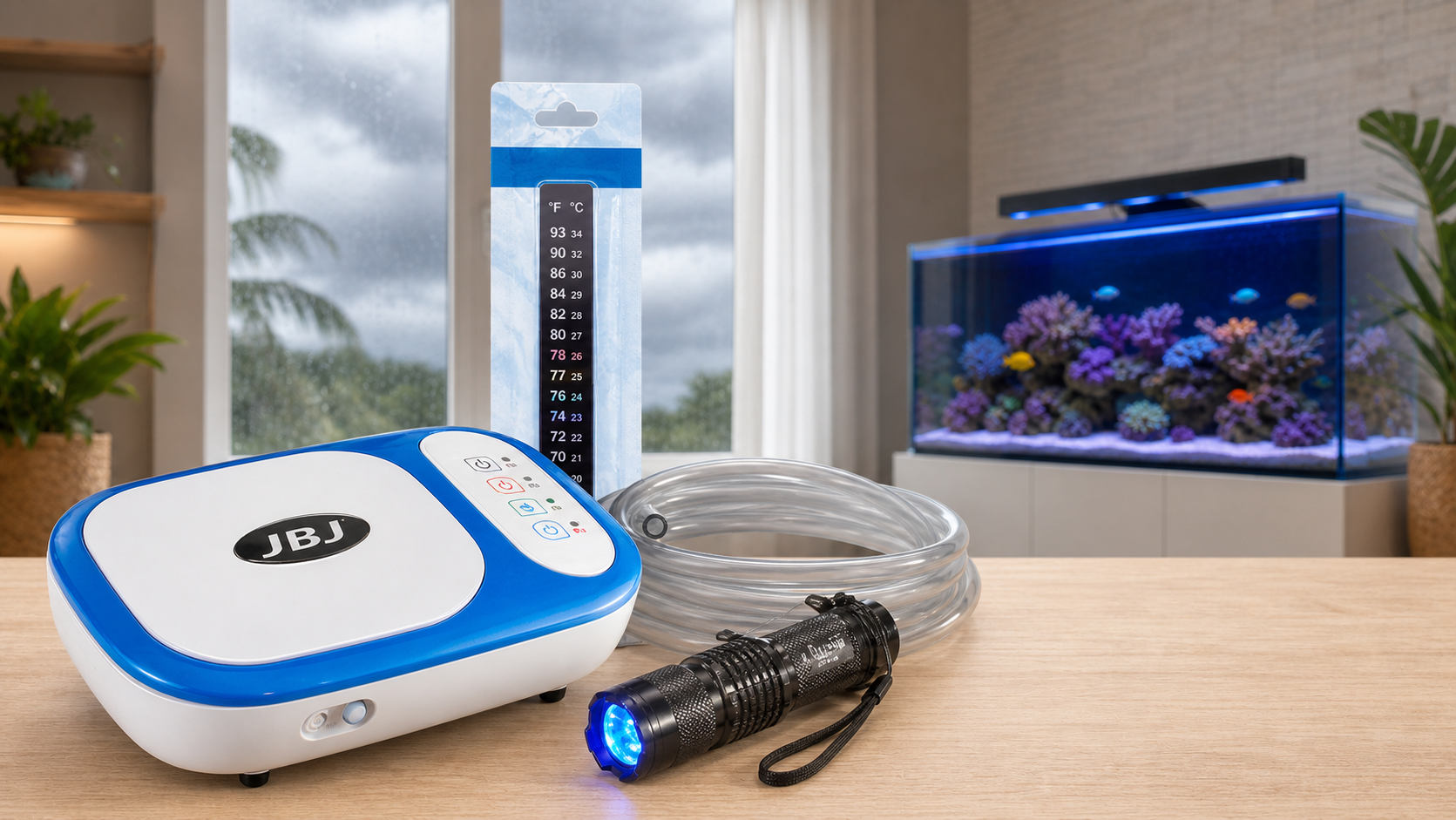
The emergency equipment shown above is the actual BRS Power Outage Bundle.
I have said this before because it matters: during a power outage, oxygen is the first problem I want you thinking about. A still surface means very little gas exchange. Your fish keep using oxygen, carbon dioxide keeps building, and the tank can get into trouble long before the water looks terrible.
That does not mean temperature, filtration, or water quality do not matter. They do. It means there is an order. If you have limited backup power, do not waste the first part of it trying to make the aquarium look normal. Keep the animals breathing first. Then deal with temperature and everything else based on what is actually happening.
Move the surface. Watch temperature. Know how long your tested backup really lasts. Make sure an actual person receives the alert. Do not let a vacation become the first live test of new equipment.
Are You Dealing With an Outage—or Planning Ahead?
The power is out right now
Confirm that this is a real power loss, start your tested air or flow backup, check water temperature, look at the animals, and estimate how long the outage may last. Keep the plan focused. Lighting and convenience equipment are not the first priority.
You are preparing to leave town
Test automation early, reduce the number of things a caretaker can accidentally change, pre-measure food, set safe top-off limits, confirm alerts, and leave one simple page that tells the person what normal looks like and who to call.
What to Protect First During a Power Outage
I want this order written down before you need it. During an outage, it is very easy to plug too many things into a battery or generator because all of the equipment feels important. Your return pump, skimmer, lights, heater, powerheads, controller, ATO, doser, and refugium light do not all need equal priority at the same moment.
A battery-powered air pump or a backed-up powerhead in the display can keep the surface moving without spending power on the whole system. If your tank is heavily stocked, unusually warm, or already has poor gas exchange, the margin may be smaller. That is exactly why I do not want you relying on somebody else’s runtime or survival estimate.
If the Power Goes Out: Do These Things First
- Confirm what failed. Is the whole home without power, one outlet dead, a GFCI tripped, or one pump stopped? Do not reset a wet, damaged, hot, or repeatedly tripping circuit.
- Start the tested oxygen plan. Turn on the battery air pump or confirm the backed-up powerhead started. Put the airline or airstone where it creates obvious surface movement.
- Look at the animals. Rapid breathing, fish collecting near the surface, unusual lethargy, or animals crowding the strongest flow are warning signs.
- Check temperature with a thermometer that does not depend on the failed system. Record it. A trend matters more than one anxious reading.
- Estimate the event. A brief neighborhood outage is different from an ice storm, hurricane, wildfire shutdown, or a failed electrical circuit that needs an electrician.
- Save power. Run what protects life, not everything that normally runs.
- Call the backup person early if you are away. An alert is useful only when somebody can safely act on it.
Choose Backup Equipment for the Job You Need It to Do
Battery air pump
This is the simplest oxygen plan for many beginner tanks. It is inexpensive, uses very little power, and can create the surface movement that keeps gas exchange going. Confirm that it starts the way you expect, keep the airline ready, and replace or recharge batteries before they become an emergency.
Pump-specific battery backup
A compatible battery can keep a circulation pump running automatically. Compatibility matters. Use the current manual for the exact battery, pump, cable, and operating mode. Then actually unplug the normal power and make sure the backup works the way you expect.
UPS or portable power station
These can power selected equipment, but the label on the box is not your aquarium runtime. The real result depends on battery condition, inverter losses, startup draw, temperature, and the equipment you connect. Measure the actual load and test the plan.
Generator
A generator may be appropriate for longer outages and extreme temperatures, but it adds serious carbon-monoxide, fuel, weather, cord, transfer-switch, and overload risks. Follow the manufacturer, fire-safety, and electrical requirements. Never backfeed a home through an outlet.
Test Everything Before the Storm or the Trip
Testing is where a backup plan becomes real. Charge the battery, connect only the equipment you intend to protect, unplug the normal power source, and watch what happens. Did the device switch automatically? Did the pump restart? Is the surface actually moving? Does the alert reach your phone when your home internet is also down?
Write down the date, connected equipment, battery condition, power setting, start time, and end time. Retest often enough that you trust the result. A runtime from a product page is a starting point, not a promise for your exact setup.
Know What You Will Do About Temperature
Once oxygen and circulation are protected, watch the temperature trend. A small aquarium can change faster than a large one. A closed room can heat up quickly in summer, and a poorly insulated room can cool quickly in winter.
| What is happening? | What I would do | What I would avoid |
|---|---|---|
| Temperature is stable | Keep recording it and protect oxygen. Do not spend power just because the heater normally runs. | Making a large correction before a trend exists. |
| Tank is slowly cooling | Reduce room heat loss, insulate the tank sides without covering the gas-exchange area, and use safe backup heat only when the trend and outage length require it. | Unattended improvised heaters, flames, or wrapping the tank so tightly that gas exchange disappears. |
| Tank is slowly warming | Reduce room heat, shade the aquarium, maintain surface movement, and use safe cooling or backup power based on the measured trend. | Dumping loose ice into saltwater or making a rapid temperature swing. |
| Room itself is unsafe | Follow local emergency guidance and decide whether people and animals need to move to a safe powered location. | Staying in dangerous heat, cold, smoke, floodwater, or structural conditions for the aquarium. |
Prepare the Aquarium Before Vacation
A vacation plan is mostly about removing surprises. I do not want you doing a huge cleaning, changing a dosing program, installing a brand-new ATO, or adding a bunch of livestock right before you leave. Give the tank time to show you that the plan works.
- Complete normal maintenance early enough to confirm the aquarium returned to normal.
- Inspect pumps, filtration, heaters, ATO sensors, tubing, drains, dosing lines, and anything that can leak or stop.
- Test the backup air or power system and confirm the alert reaches both you and the person who can respond.
- Fill only appropriately sized reservoirs. More water is not always safer if a stuck device can add all of it.
- Pre-measure food by day. Do not leave a large container and ask the sitter to guess.
- Use an auto feeder only after it has dispensed correctly for days and remained dry, secure, and unclogged.
- Leave spare airline, batteries, a known-good pump or heater when appropriate, towels, a flashlight, and the exact contact list.
- Take clear photos of what “normal” looks like: water level, temperature, return flow, controller screen, skimmer cup, and the animals.
If your trip is longer than your tested automation and supplies can safely cover, schedule a real person. A camera is useful, but a camera cannot restart a pump, remove a leaking device, or safely follow an emergency plan.
Give the Tank Sitter One Simple Page
Your tank sitter does not need a crash course in reef chemistry. They need a short list of what to check, what they are allowed to touch, what they should never change, and who to call.
Every visit
Confirm water is moving, temperature is within your written normal range, the floor and cabinet are dry, fish are breathing normally, the ATO reservoir has the planned amount, and no alarm is active.
Allowed actions
Feed one labeled portion, refill only to a marked limit if instructed, switch on the named backup, send photos, and call the listed contact.
Do not touch
Dosing settings, controller programming, plumbing valves, salinity corrections, chemical additions, electrical panels, unfamiliar alarms, or any wet/damaged electrical equipment.
When they should call you
Call immediately for no flow, rapid breathing, temperature outside the written limit, water on the floor, burning smell, repeated breaker trip, dead livestock, or anything the instructions do not clearly cover.
When Power Comes Back, Restart One Thing at a Time
Power coming back does not automatically mean everything is fine. Pumps may fail to restart, return plumbing may gurgle or leak, a skimmer may overflow, a doser may catch up incorrectly, and a battery device may stay in the wrong mode.
- Keep the temporary air or flow running while you inspect the system.
- Check the display, rear chamber or sump, plumbing, cords, outlets, and floor before restoring equipment.
- Restart essential circulation and verify real flow—not just a light on the controller.
- Confirm water levels, drains, returns, siphon breaks, and leak-free operation.
- Restore temperature control and watch the trend. Do not force a rapid correction.
- Restart filtration and skimming cautiously; watch for overflow and unusual water level.
- Verify ATO, dosing, feeder, alerts, and programmed schedules. Do not assume they kept the correct time or state.
- Test water when the length or conditions of the outage give you a reason, then make measured corrections rather than changing everything at once.
- Recharge or replace the backup supplies immediately and write down what failed.
If a pump does not restart cleanly, use the saltwater aquarium pump cleaning and restart guide. For a long event or a system that behaved unexpectedly, return to the water-testing guide and respond to the results you actually measure.
What Changes for the Three Beginner Tanks
DeskMate 4.8
The small water volume can change temperature quickly, and there is little room for oversized equipment. A simple battery air pump, an independent thermometer, a very small caretaker task list, and a tightly limited top-off supply make more sense than trying to run the whole system.
HelloReef 15
Keep the plan simple. Protect surface movement, check the rear-chamber water level, test the ATO and feeder well before you travel, and use the HelloReef instructions for the equipment included with the kit.
JBJ RF-45
The larger volume changes more slowly, but there is more livestock and equipment depending on circulation. Identify which display pump or air system protects oxygen most efficiently, keep an appropriate spare return or circulation pump, and give the caretaker clear rear-chamber and water-level photos.
Every other aquarium
Count the single points of failure: one return pump, one heater, one ATO sensor, one internet connection, one person with access. Then decide which failure needs a spare, a battery, an alert, a manual check, or a qualified professional.
Common Mistakes I Want You to Avoid
- Backing up lights while the display has no oxygen plan.
- Believing the runtime on a box without testing the actual connected load.
- Letting an alert reach only the person who is on an airplane.
- Installing an ATO, doser, feeder, controller, or battery the day before a trip.
- Leaving unlimited food, top-off water, or additives for a caretaker.
- Assuming every pump and program restarted correctly when power returned.
- Running a generator indoors, in a garage, near openings, in wet conditions, or by backfeeding a wall outlet.
- Trying to fix every number immediately after an outage instead of restoring oxygen, flow, temperature, and stable operation first.
Frequently Asked Questions
What is the first thing a saltwater aquarium needs during a power outage?
Surface movement and gas exchange. Use the tested air pump or backed-up circulation plan immediately, then monitor temperature and the animals.
Do I need to run the aquarium lights during an outage?
Usually, lighting is not the first use of limited backup power. Prioritize oxygenation, essential circulation, and temperature based on the measured conditions and livestock needs.
How long will my battery backup run?
There is no reliable universal answer. Battery age, charge, temperature, inverter losses, pump setting, startup draw, and the connected load all matter. Test your exact combination and record the result.
Can I use a computer UPS for my aquarium?
Possibly, if the equipment, load, waveform requirements, wet-location safety, and manufacturer instructions are compatible. Measure the load and test the exact setup. Do not assume the printed capacity equals usable runtime.
Should I feed fish during a power outage?
For a short outage, feeding is usually not the first priority. Extra food increases oxygen demand and waste. Follow the needs of the actual animals and event, but do not feed automatically just because it is the normal time.
How early should I test vacation equipment?
Early enough to watch it operate through normal maintenance cycles and fix problems without rushing. Some equipment may need days or weeks of proven operation. The exact instructions and your tank’s risk determine the lead time.
Should the caretaker adjust salinity or dosing?
Not unless you have provided a specific, measured, bounded instruction and the person is qualified to follow it. For most sitters, photos, pre-measured food, marked refill limits, and a call list are safer than chemistry changes.
What should I do after the power returns?
Inspect for water and electrical problems, restore essential circulation, verify actual flow and water levels, restart one piece of equipment at a time, watch temperature, confirm automation and alerts, and recharge the backups.
For the short version of why this matters, read the power-outage lesson in Things I Wish I Knew. For the rest of the equipment jobs that happen because something changed or wore out, return to the Long-Term & As-Needed Maintenance guide.
- Bulk Reef Supply: power outages and saltwater aquariums
- Bulk Reef Supply: preparing a saltwater aquarium for vacation
- EcoTech Marine: current battery-backup manuals and compatibility
- American Red Cross: power-outage preparation and safety
- American Red Cross: safe generator use
- Ready.gov: power-outage planning
Exact equipment instructions, local electrical and fire codes, utility guidance, and emergency officials control. This guide does not promise a universal survival time, battery runtime, temperature limit, generator size, caretaker schedule, or safe response for every aquarium and event.